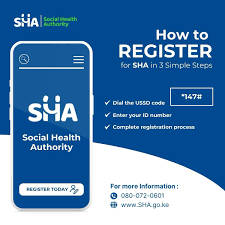
Healthcare is one of the most important aspects of life, and having access to quality and affordable medical services can be a matter of life and death. In Kenya, the government has introduced the Social Health Authority (SHA) to ensure every citizen has access to comprehensive healthcare services without financial strain.
This guide will take you through everything you need to know about applying for SHA, including the registration requirements, step-by-step application process, payment methods, and how to check your registration and health status.
By the end of this article, you will be fully equipped to successfully register for SHA and secure healthcare coverage for yourself and your family
READ MORE:
How to Apply for HELB Loan in Kenya (Step-by-Step Guide)
Best Survey Sites To Make Money Online In Kenya: Complete Guide 2025
Best Kenyan Niches for YouTube in 2025 (Profitable & Evergreen Ideas)
Triaba Kenya Review: Everything You Need to Know Before Joining
What is the Social Health Authority (SHA)?
The Social Health Authority (SHA) is a government body in Kenya that manages health insurance for citizens and residents. It was created to replace the National Health Insurance Fund (NHIF), modernizing healthcare coverage and streamlining services under a single, efficient system.

The SHA plays a vital role in:
- Providing affordable healthcare coverage to all citizens and legal residents.
- Reducing out-of-pocket expenses when seeking treatment.
- Ensuring universal health coverage (UHC), so no one is left behind.
- Offering preventive, curative, and rehabilitative healthcare services.
Whether you are employed, self-employed, or unemployed, SHA membership ensures that you and your dependents have access to medical care when needed.
Why You Should Register for SHA in Kenya
Healthcare costs in Kenya continue to rise, making it difficult for many families to afford proper medical care. By registering with SHA, you gain access to affordable, reliable healthcare services across the country.
Here are some key benefits of SHA membership:
1. Affordable Healthcare
SHA provides subsidized medical services, reducing the amount you need to pay out-of-pocket for treatments and medication.
2. Nationwide Hospital Access
With an SHA membership, you can access accredited hospitals and clinics across Kenya, including both public and private facilities.
3. Family Coverage
You can register your spouse and children as dependents, ensuring your whole family is protected under one plan.
4. Coverage for Chronic and Critical Illnesses
SHA caters for long-term treatments, including chronic illnesses like diabetes, hypertension, cancer, and other critical conditions.
5. Support for Preventive Health Services
The authority also covers preventive health services such as vaccinations, health screenings, and maternal care.
By enrolling in SHA, you not only secure peace of mind but also contribute to a stronger national healthcare system.
Check: Free hashtag generator tool
Requirements for SHA Registration
Before applying for SHA, you must prepare certain documents and meet the eligibility criteria. Having these ready will ensure a smooth and quick registration process.
Eligibility for SHA
- Kenyan citizens.
- Legal residents with valid permits or documentation.
- Families, including spouses and children, can be added as dependents.
Documents Needed for Registration
- National ID card or valid passport (for foreign nationals).
- Birth certificate for children and dependents.
- Passport-sized photo for identification.
- KRA PIN (for adults).
- Proof of residence, such as a utility bill or tenancy agreement.
- Marriage certificate (if registering a spouse).
Make sure all documents are valid and up-to-date before beginning the application process.
Step-by-Step Guide to Applying for SHA
You can register for SHA through three main channels: online via the SHA portal, in person at Huduma Centres, or using your mobile phone (if the service is available in your area).
Option 1: Online Registration via SHA Portal
This is the most convenient way to apply for SHA, especially if you have access to a smartphone or computer.
Step 1: Visit the official SHA Kenya website
- Open your browser and search for SHA portal LINK
Step 2: Create an account
- Click on the “Register” button.
- Enter your national ID number, phone number, and other required personal details.
- Create a secure password.
Step 3: Fill in your details
- Provide accurate information such as your full name, date of birth, and address.
- Upload the required documents (ID, KRA PIN, photos, etc.).
Step 4: Add dependents
- Include your spouse and children by entering their details and uploading their documents.
Step 5: Submit your application
- Review all the information carefully to avoid mistakes.
- Submit the application and wait for a confirmation message.
Step 6: Confirmation
- You will receive an SMS or email confirming your registration.
- Your SHA number will be provided for future use.
Option 2: Registration at Huduma Centres If you prefer a face-to-face application, you can visit the nearest Huduma Centre for assistance.
Step 1: Locate the nearest Huduma Centre.
Step 2: Carry all required documents.
Step 3: Request for SHA registration forms at the service desk.
Step 4: Fill in your details clearly and accurately.
Step 5: Submit the completed form and documents to the Huduma officer.
Step 6: Receive a receipt or confirmation slip indicating your registration is in process.
Option 3: Mobile Registration (USSD Code)
In some areas, SHA provides mobile registration through a USSD code.
Step 1: Dial *147# code on your phone.
Step 2: Select the “Register” option.
Step 3: Enter your national ID and personal details.
Step 4: Confirm your details and submit.
Step 5: Receive an SMS confirming successful registration.
Check: Free word counter tool
SHA Contribution and Payment Plans After registration, you must contribute to SHA to activate and maintain your coverage. The amount you pay depends on whether you are employed, self-employed, or unemployed.
For Employed Individuals
- Contributions are deducted directly from your salary by your employer.
- Rates vary based on your income bracket.
For Self-Employed Individuals
- You can make voluntary monthly contributions through M-Pesa, bank transfer, or Huduma Centers.
- A fixed monthly rate is usually applied.
Payment Methods
- M-Pesa—Quick and easy mobile payment.
- Bank Transfer—Ideal for bulk or employer contributions.
- Huduma Centre Cash Payment—For those without mobile or online access.
How to Check Your SHA Registration Status
After applying, it’s essential to confirm that your registration has been processed successfully.
Option 1: Online Portal
- Log in to your SHA account using your ID and password.
- Navigate to the “Status” section to check if your membership is active.
Option 2: SMS Service
- Send your ID number to the official SHA short code.
- You will receive an automated response with your registration status.
Common Mistakes to Avoid During SHA Registration
To ensure a smooth registration process, avoid these common pitfalls:
- Submitting incorrect personal details—Double-check all information before submission.
- Omitting required documents—Ensure every required document is uploaded or presented.
- Failing to add dependents—Remember to register your family members during the initial process.
- Missing payment deadlines – Keep track of contribution dates to maintain active coverage.
- Using unofficial websites or agents—Always apply through the official SHA channels to avoid fraud.
Frequently Asked Questions (FAQs) 1. How long does SHA registration take?
Processing typically takes between 24 hours and 7 days, depending on the method used.
2. Can I register my whole family under one account?
Yes, you can include your spouse and children as dependents during registration.
3. What happens if I miss a payment?
Your SHA account may become inactive, and you could lose coverage until payments are up to date.
4. Does SHA cover maternity services?
Yes, SHA covers prenatal, delivery, and postnatal care services in accredited hospitals.
5. Is SHA different from NHIF?
Yes, SHA replaced NHIF to create a more modern, streamlined health insurance system in Kenya
Check: Youtube name generator