Are you trying to log into the KRA iTax portal but hitting a wall? Whether you are filing your returns, checking your PIN, or paying taxes, this guide will walk you through every step—and show you exactly how to fix the most common login errors.
What is the KRA iTax Portal?
The Kenya Revenue Authority (KRA) iTax portal is the official online platform for managing your tax obligations. Through iTax, you can file tax returns, pay your taxes, register for a KRA PIN, and access your taxpayer dashboard.
Think of it as your personal tax command center. Your KRA PIN is your unique identification number, and it is mandatory for filing tax returns, opening a bank account, or applying for government tenders.
The only way to access these services is by logging in successfully to itax.kra.go.ke.
How to Log In to KRA iTax (Step-by-Step)
Getting into your iTax account is actually a very simple process once you know what to do. Follow these five steps carefully to get into your dashboard without any stress.
Step 1: Go to the Official Portal
Open your web browser (Chrome, Safari, or Firefox) and type in the official KRA iTax web address: itax.kra.go.ke.
Make sure you are on the correct site. Do not use third-party websites, as they are often phishing scams.
Step 2: Choose Your Login Method
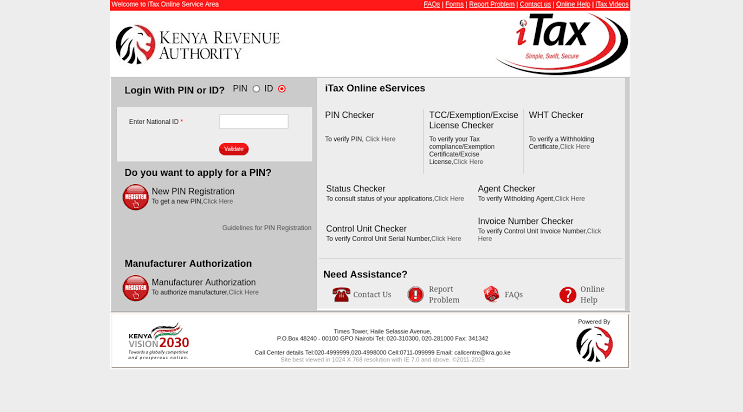
Once the page loads, you will see the “Login” section. KRA has recently updated the portal to allow two different ways to log in:
- Using your KRA PIN: Type in your 11-character KRA PIN (e.g., A123456789P).
- Using your National ID: If you have registered for the ID login option, you can enter your National ID number.
Most users prefer using their KRA PIN. If you have lost it, you can use the PIN Checker tool on the homepage to retrieve it.
Step 3: Enter Your Password
After entering your PIN or ID, you will be asked for your iTax password.
- If you are logging in for the first time: Your default password is usually your Date of Birth in the format DDMMYYYY (e.g., 15011990).
- If you have logged in before: Use the password you created during your last visit.
Step 4: Solve the Security Check
To protect your account from hackers, the system will ask you to complete a quick verification.
Usually, this is a simple arithmetic question (like “What is 5 + 3?”) or a CAPTCHA where you type the letters you see in a distorted image.
Step 5: Click Login
Once you have filled in everything correctly, click the blue “Login” button. If your details are correct, you will be taken straight to your taxpayer dashboard, where you can see your tax obligations, file returns, and pay bills.
Common KRA Portal Login Errors and How to Fix Them
Sometimes, the KRA portal can be stubborn. Here are the three most common errors users face, and the exact fixes for them.
Error 1: “Invalid Password”
The Problem: You have typed your password incorrectly, or you have simply forgotten it.
The Fix: Do not keep guessing. Click the “Forgot Password” link on the login page. KRA will send a password reset link to your registered email address or phone number. Follow the instructions in the link to set a new password.
Error 2: “Account Locked”
The Problem: This happens when you have tried to log in with the wrong password multiple times in a row (usually 5 times). The system locks your account to protect it from hackers.
The Fix: Wait for 24 hours for the system to automatically unlock your account. If you cannot wait, visit a physical KRA office with your National ID to have it manually unlocked.
Error 3: “Invalid KRA PIN”
The Problem: You are typing the wrong PIN, or you have missed a character.
The Fix: Double-check that you have entered all 11 characters correctly. Remember, a KRA PIN always ends with a letter (P, for example). If you have lost your PIN, click on the “PIN Checker” tool on the KRA homepage. Enter your ID number, and the system will show you your correct PIN.
Frequently Asked Questions (FAQs)
Q: How do I log in to the KRA portal without a PIN?
A: Yes, you can now log in using your National ID number if you have registered for the ID login option. If not, you must apply for a PIN first.
Q: Can I use my phone to access the KRA portal?
A: Yes, the iTax portal is fully responsive and works well on mobile phone browsers. However, if you are having trouble seeing the login button, try switching your phone browser to “Desktop Mode” or use a computer for a smoother experience.
Q: What if I forgot my email address?
A: You cannot reset your password without a registered email. You will need to visit a KRA office in person, carrying your National ID, to update your contact details before you can log in again.